Easy to use Reference-Grade Digital Room Correction.
Find out more at: https://definiteAudio.de
Discover a New Level of Audiophile Listening with rooDRC
Experience reference-grade digital room correction based on the proven Acourate correction algorithms, now combined with an intuitive and effortless workflow. rooDRC brings exceptional FIR correction quality for a reasonable price to your Roon system, making precise room optimization accessible for everyone without the complexity traditionally associated with advanced DRC solutions.
Reference-Grade Correction Powered by Acourate Technology.
rooDRC brings the outstanding precision of Acourate-based digital room correction to your Roon system. Using advanced FIR filter technology and the new acouStep technology, rooDRC delivers exceptional accuracy and transparency, allowing you to experience your music exactly as intended. Enjoy the same high-quality correction approach trusted by demanding audiophiles — now available in a streamlined Roon workflow.
Simple Measurement. Powerful Results.
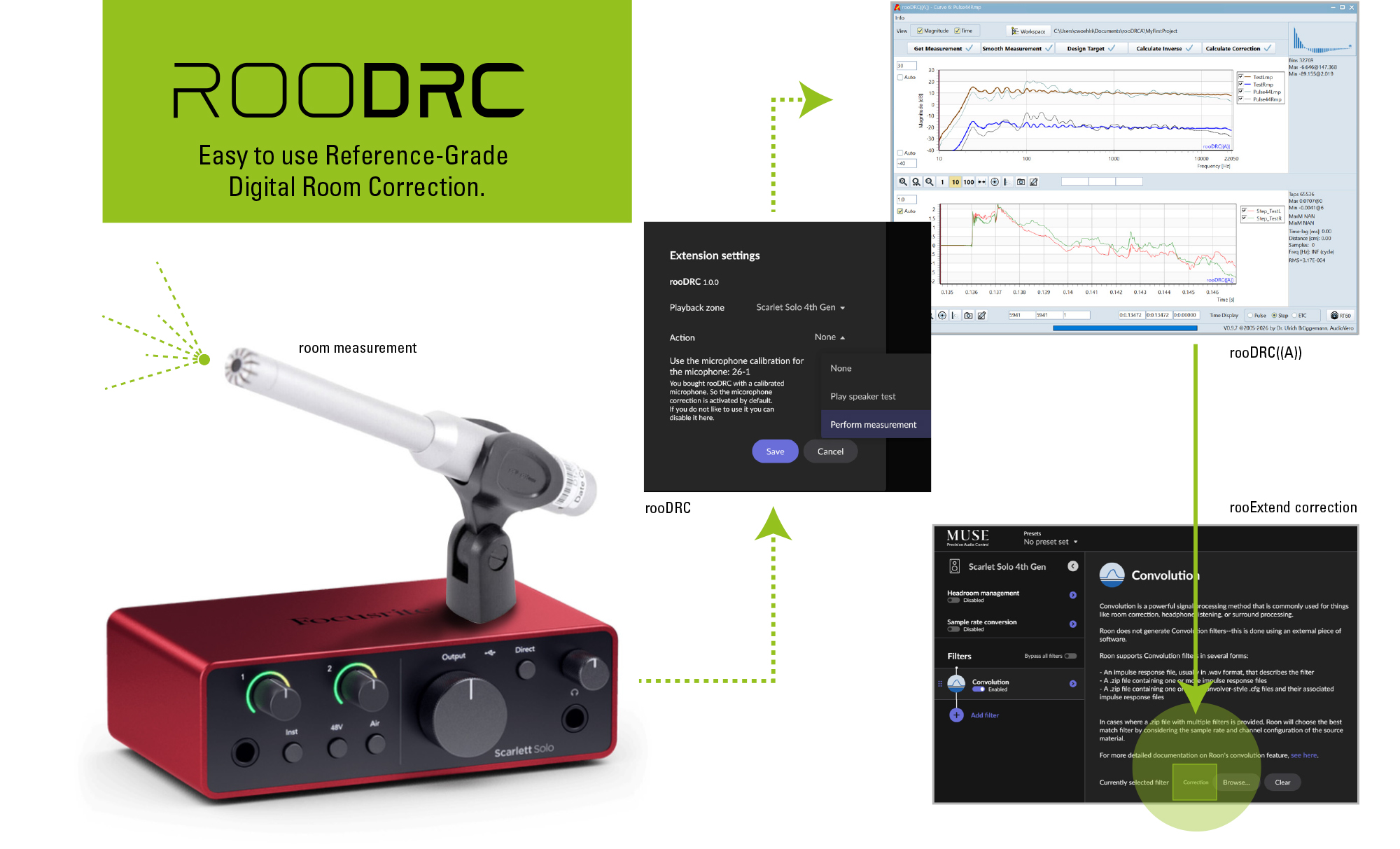
Achieving perfect room optimization has never been easier. rooDRC offers a Plug&Play solution for precise room measurements using a Focusrite Scarlett Solo Gen4 audio interface - other audio interfaces can also be used - and guides you through the process with an intuitive workflow.
The included rooDRC((A)) MS-Windows application creates the optimized FIR correction filters automatically, combining professional-level results with effortless operation.
On Mac everything runs smoothly in the browser. So no need to install anything or create an account!
Professional Room Correction Made Accessible.
rooDRC removes the complexity traditionally associated with advanced digital room correction. No complicated setup procedures or expert knowledge are required — just accurate measurements, powerful correction algorithms, and a simple path to a better listening experience.
Seamless Integration with Roon.
Designed as a native Roon Extension, rooDRC integrates perfectly into your existing system. Enjoy the benefits of reference-grade room correction while keeping the simplicity and flexibility that makes Roon the preferred platform for music lovers worldwide.
Flexible Microphone Options.
rooDRC adapts to your individual microphone setup.
- Choose a professionally calibrated microphone from us for a complete measurement solution.
- Use your own microphone (XLR) and send us its calibration file for conversion to rooDRC.
- Use a reference (flat) microphone (XLR) and order only the rooDRC license key.
Why Choose rooDRC?
- Reference-Grade Correction:
Experience digital room correction based on Acourate, featuring advanced FIR filter technology (referred to in Roon as "convolution filters"). - Exceptional Sound Quality:
Optimize your listening environment with precise measurements and high-quality correction filters. - Simple Workflow:
Enjoy professional-level room correction without the complexity of traditional DRC solutions. - Seamless Roon Integration:
Enjoy advanced room optimization directly within your Roon ecosystem. - Flexible Microphone Options:
Use your own microphone, have your calibration file converted, or choose a calibrated microphone from us. - Complete Solution:
Measure your room with the Focusrite Scarlett Solo Gen4 interface and create optimized FIR filters with the included rooDRC((A)) application or directly in the browser (Mac users only).
Transform your listening experience with rooDRC — bringing reference-grade room correction quality and effortless usability together in one powerful Roon Extension.
This is what @Amirm from Audiosciencereview says about Digital Room Correction:
"Nearly 20 years ago I had my first experience with room correction courtesy of a now defunct company, TacT. I remember being startled with what I heard. The transformation is incredible. I forever became convinced that room equalization is mandatory in any home system. As soon as I turned on the Focus mode, the (somewhat) boomy bass disappeared, resolution in bass became much higher (allowing individual tones to be distinguished). Soundstage opened up with sound losing its congested character. Everything you think "hifi" is, is applied yet again to your system. You want to sit there and re-listen to your entire library again.
If you have not heard a proper room equalization system, I don't know that you can ever understand the words above. Suffice it to say, nothing, nothing you can do to your system to uplift its performance as much as room equalization can. Why? Details will become obvious in the objective section next but for now, the room gets a hold of the sound out of your speakers and massively modifies the frequency response. Since we are so sensitive to frequency response changes, we hear that as massive coloration."
Things you need using rooDRC with the rooExtend-Box
- A rooExtend-Box.
- A measurement microphone (see above).
- The Focusrite Scarlet Solo Gen4 audio interface or any other USB-Audio Class2 audio interface.
- An XLR-microphone cable. For example Cordial CIM FM.
- Two XLR output cables to connect your Focusrite Scarlet Gen4 to your audio gear. For example Cordial CFM MV.
- A simple microphone Stand or tripod.
- A 3A Power supply for the rooExtend-Box.
- rooDRC license key (buy here on this website).
- Windows PC or Mac to run Roon and rooDRC((A)).
Things you need using rooDRC with a Raspberry Pi4
- A measurement microphone (see above).
- The Focusrite Scarlet Solo Gen4 audio interface or any other USB-Audio Class2 audio interface.
- An XLR-microphone cable for example Cordial CIM FM.
- Two XLR output cables to connect your Focusrite Scarlet Gen4 to your audio gear. For example Cordial CFM MV.
- A simple microphone Stand or tripod.
- RaspberryPi 4 2GB RAM are ok, for future more would be better.
- A 3A Power supply for the Pi4.
- Micro SD card min 16GB Class 10.
- A Windows PC or a Mac with a SD card slot or an external SD card device that can connect to the PC.
- Wired Ethernet (WiFi not recommended).
- balenaEtcher Software (download here for free).
- rooExtend SD card image (download here for free).
- rooDRC License key (buy here on this website).
Note:
To set up convolution filters in Roon, Roon must be launched on a Windows or Mac computer!
rooDRC((A)) is part of rooDRC. When using a Windows computer, a button appears for downloading and locally installing rooDRC((A)). If you are using a Mac, the cloud version of rooDRC((A)) opens immediately in your browser—no installation required.
Video tutorials to help you make it run
Licensing:
- The rooDRC license is valid for one device and one customer per license key. All license options are lifelong licenses with no recurring fees.
- Choose the option that best fits your setup:
License Key plus calibrated microphone:
For customers without a suitable microphone. Includes a professionally calibrated ECM8000 microphone ready for use with rooDRC.
License Key plus Calibration File Conversion:
For customers who already own a microphone with a calibration file. Send us your calibration file and we will convert it for use with rooDRC.
License Key only:
For customers who already have a suitable microphone and do not require microphone calibration conversion. - The transfer of the license from one RaspberryPi or rooExtend-Box to another RaspberryPi or rooExtend-Box is always possible by revoking the license on the licensed device and then entering the license key on the new device.
- If the RaspberryPi or rooExtend-Box is physically destroyed or no longer works for any other reason before the license has been revoked, this inevitably leads to the loss of the license.
- Companies are prohibited from flashing the roonExtend image onto SD cards and then selling these preinstalled SD cards.
- Companies are expressly prohibited from bundling a RaspberryPi with such a preinstalled card and selling it as a package. If you are a reseller and have plans in this direction, please contact me at [email protected].